Fractals/mandelbrot-graphics
Parts
- Library and c programs for CPU-based visualisation of the Mandelbrot set by Claude Heiland-Allen[1]
- mandelbrot-prelude library for Haskell (low resolution image in terminal with block graphics characters)
Install
Dependencies
- pkg-config
- math
- gmp
- mpfr
- mpc
- pari
- ghci
- cairo ( and pixman )
- mandelbrot-numerics
- mandelbrot-symbolics
- openmp
shared libraries
ldd m-render
	linux-vdso.so.1 =>  (0x00007ffcae4e7000)
	libmandelbrot-graphics.so => /home/a/opt/lib/libmandelbrot-graphics.so (0x00007fb8f9a12000)
	libcairo.so.2 => /usr/lib/x86_64-linux-gnu/libcairo.so.2 (0x00007fb8f96df000)
	libmandelbrot-numerics.so => /home/a/opt/lib/libmandelbrot-numerics.so (0x00007fb8f94cf000)
	libpthread.so.0 => /lib/x86_64-linux-gnu/libpthread.so.0 (0x00007fb8f92b2000)
	libc.so.6 => /lib/x86_64-linux-gnu/libc.so.6 (0x00007fb8f8ee9000)
	libm.so.6 => /lib/x86_64-linux-gnu/libm.so.6 (0x00007fb8f8bdf000)
	libgomp.so.1 => /usr/lib/x86_64-linux-gnu/libgomp.so.1 (0x00007fb8f89bd000)
	libpixman-1.so.0 => /usr/lib/x86_64-linux-gnu/libpixman-1.so.0 (0x00007fb8f8715000)
	libfontconfig.so.1 => /usr/lib/x86_64-linux-gnu/libfontconfig.so.1 (0x00007fb8f84d1000)
	libfreetype.so.6 => /usr/lib/x86_64-linux-gnu/libfreetype.so.6 (0x00007fb8f8227000)
	libpng12.so.0 => /lib/x86_64-linux-gnu/libpng12.so.0 (0x00007fb8f8002000)
	libxcb-shm.so.0 => /usr/lib/x86_64-linux-gnu/libxcb-shm.so.0 (0x00007fb8f7dfd000)
	libxcb-render.so.0 => /usr/lib/x86_64-linux-gnu/libxcb-render.so.0 (0x00007fb8f7bf3000)
	libxcb.so.1 => /usr/lib/x86_64-linux-gnu/libxcb.so.1 (0x00007fb8f79d1000)
	libXrender.so.1 => /usr/lib/x86_64-linux-gnu/libXrender.so.1 (0x00007fb8f77c6000)
	libX11.so.6 => /usr/lib/x86_64-linux-gnu/libX11.so.6 (0x00007fb8f748c000)
	libXext.so.6 => /usr/lib/x86_64-linux-gnu/libXext.so.6 (0x00007fb8f727a000)
	libz.so.1 => /lib/x86_64-linux-gnu/libz.so.1 (0x00007fb8f705f000)
	librt.so.1 => /lib/x86_64-linux-gnu/librt.so.1 (0x00007fb8f6e57000)
	libmpc.so.3 => /usr/local/lib/libmpc.so.3 (0x00007fb8f6c3e000)
	libmpfr.so.4 => /usr/local/lib/libmpfr.so.4 (0x00007fb8f69db000)
	libgmp.so.10 => /usr/local/lib/libgmp.so.10 (0x00007fb8f6764000)
	/lib64/ld-linux-x86-64.so.2 (0x0000564eca780000)
	libdl.so.2 => /lib/x86_64-linux-gnu/libdl.so.2 (0x00007fb8f6560000)
	libexpat.so.1 => /lib/x86_64-linux-gnu/libexpat.so.1 (0x00007fb8f6336000)
	libXau.so.6 => /usr/lib/x86_64-linux-gnu/libXau.so.6 (0x00007fb8f6132000)
	libXdmcp.so.6 => /usr/lib/x86_64-linux-gnu/libXdmcp.so.6 (0x00007fb8f5f2b000)
objdump -p m-render | grep NEEDED
  NEEDED               libmandelbrot-graphics.so
  NEEDED               libcairo.so.2
  NEEDED               libmandelbrot-numerics.so
  NEEDED               libpthread.so.0
  NEEDED               libc.so.6
objdump -p m-stretching-cusps | grep NEEDED
  NEEDED               libmandelbrot-graphics.so
  NEEDED               libcairo.so.2
  NEEDED               libmandelbrot-numerics.so
  NEEDED               libm.so.6
  NEEDED               libgmp.so.10
  NEEDED               libpthread.so.0
  NEEDED               libc.so.6
git
git clone https://code.mathr.co.uk/mandelbrot-graphics.git
and in the directory containing mandelbrot-graphics:
 make -C mandelbrot-graphics/c/lib prefix=${HOME}/opt install
 make -C mandelbrot-graphics/c/bin prefix=${HOME}/opt install
hen to run do:
export LD_LIBRARY_PATH=${HOME}/opt/lib
check :
echo $LD_LIBRARY_PATH
result :
/home/a/opt/lib
or
export PATH=${HOME}/opt/bin:${PATH}
check :
echo $PATH
To set it permanently change file :
update
git
From console opened in the mandelbrot-graphics directory :
git pull
If you made some local changes you can undu them :
git checkout -f
then
git pull
Now install again
recompile new version
bash script :
#!/bin/bash
cd ~
make -C mandelbrot-graphics/c/lib prefix=${HOME}/opt install
make -C mandelbrot-graphics/c/bin prefix=${HOME}/opt install
export LD_LIBRARY_PATH=${HOME}/opt/lib
export PATH=${HOME}/opt/bin:${PATH}
cd /home/a/mandelbrot-graphics/c/bin
names
m
prefix m is from Mandelbrot
r/d
prefix r or d in name describes precision
- d = double precision
- r = arbitrary precision
examples:
 m_d_attractor(double _Complex *z_out, double _Complex z_guess, double _Complex c, int period, int maxsteps)
 m_r_attractor(mpc_t z_out, const mpc_t z_guess, const mpc_t c, int period, int maxsteps)
How to use it ?
prelude
Haskell program:
let c = nucleus 100 . (!! (8 * 2 * 100)) . exRayIn 8 . fromQ . fst . addressAngles . pAddress $ "1 7/12 5/9 100" ; r = 2 * magnitude (size 100 c) in putImage c r 10000
It gives :
- low resolution image in terminal with block graphics characters
- center, size and iteration number
-0.5664388911664133 + -0.4792791697756855 i @ 2.810e-8 (10000 iterations)
procedures in lib directory
- C source should *only* have #include <mandelbrot-numerics.h>
- compile and link with pkg-config: see mandelbrot-numerics/c/bin/Makefile for an example
- quickest way to get started is to just put your file in mandelbrot-numerics/c/bin and run make
m_d_transform_rectangular
m_d_transform *rect = m_d_transform_rectangular(w, h, c, r); //
where :
- w = width in pixels
- h = height in pixels
- c = center of the image ( complex number )
- r = radius of the image ( double number
m_d_interior
find points c of the Mandelbrot set, given a particular hyperbolic component and the desired internal angle. It involves Newton's method in two complex variables to solve[4]
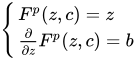
where
- p is the period of the target component
- the desired internal angle
- r is internal radius . When r = 1.0 point is on the boundary. When r = 0 point is in the center of component ( = nucleus)
- is a multiplier of point c




The hyperbolic component is described by
- period
- nucleus
Syntax
extern m_newton m_d_interior(double _Complex *z_out, double _Complex *c_out, double _Complex z_guess, double _Complex c_guess, double _Complex interior, int period, int maxsteps)
Input:
- z_guess
- c_guess ( usually nucleus of choosen hyperbolic component)
- interior ( multiplier)
- period
- maxstep
Output:
- c is the coordinates of the point ( c_out)
- z is periodic point ( z_out)
- result (m_newton) describes how Newton algorithm has ended : m_failed, m_stepped, m_converged. It is deined in ~/mandelbrot-numerics/c/include/mandelbrot-numerics.h
Examples of use:
 m_d_interior(&z, &half, nucleus, nucleus, -1, period, 64);
 m_d_interior(&z, &cusp, nucleus, nucleus, 1, period, 64);
 m_d_interior(&z, &third2, -1, -1, cexp(I * twopi / 3), 2, 64);
programs in bin directory
List :
~/mandelbrot-graphics/c/bin$ ls -1a *.c
result :
m-cardioid-warping.c
m-render.c
m-subwake-diagram-b.c
m-dense-misiurewicz.c
m-stretching-cusps.c
m-subwake-diagram-c.c
m-feigenbaum-zoom.c
m-subwake-diagram-a.c
m-warped-midgets
./m-warped-midgets
Result:
     4 -1.565201668337550256e-01 + 1.032247108922831780e+00 i @ 1.697e-02
     8 4.048996651751222142e-01 + 1.458203637665893004e-01 i @ 2.743e-03
    16 2.925037532341934199e-01 + 1.492506899834379792e-02 i @ 3.484e-04
    32 2.602618199285007261e-01 + 1.667791320926505921e-03 i @ 4.113e-05
    64 2.524934589775105209e-01 + 1.971526796077277045e-04 i @ 4.920e-06
   128 2.506132008410751344e-01 + 2.396932642510365294e-05 i @ 5.997e-07
   256 2.501519680089798192e-01 + 2.954962325906873815e-06 i @ 7.398e-08
   512 2.500378219137852631e-01 + 3.668242052764783887e-07 i @ 9.185e-09
  1024 2.500094340031833728e-01 + 4.569478652064606379e-08 i @ 1.144e-09
  2048 2.500023558032561377e-01 + 5.701985912706822671e-09 i @ 1.428e-10
  4096 2.500005886128087162e-01 + 7.121326948562671441e-10 i @ 1.783e-11
  8192 2.500001471109009610e-01 + 8.897814201389663379e-11 i @ 2.228e-12
Periodicity scan
Periodicity scan[5]: labelling a picture of parameter plane with the periods of the Mandelbrot set components can provide insights into its deeper structure.
Plik : m-period.scan.c
Run console program
./m-period-scan

usage: ./m-period-scan out.png width height creal cimag radius maxiters mingridsize minfontsize maxfontsize maxatoms periodmod periodneq
Example
./m-period-scan out1.png 1500 1000 0.0 0.0 1.5 10000 100 0.1 30.0 100 3 1
Moebius
./moebius
find point c of component with period = 2 	 multiplier = -0.4999999999999998+0.8660254037844387	 located near c=  -1.0000000000000000+0.0000000000000000
find point c of component with period = 4 	 multiplier = -1.0000000000000000+0.0000000000000000	 located near c=  -1.3107026413368328+0.0000000000000000
find point c of component with period = 4 	 multiplier = -0.4999999999999998+0.8660254037844387	 located near c=  -1.3107026413368328+0.0000000000000000
find point c of component with period = 8 	 multiplier = -1.0000000000000000+0.0000000000000000	 located near c=  -1.3815474844320617+0.0000000000000000
find point c of component with period = 8 	 multiplier = -0.4999999999999998+0.8660254037844387	 located near c=  -1.3815474844320617+0.0000000000000000
find point c of component with period = 2 	 multiplier = -0.5000000000000004-0.8660254037844384	 located near c=  -1.0000000000000000+0.0000000000000000
find point c of component with period = 2 	 multiplier = -0.8090169943749476-0.5877852522924730	 located near c=  -1.0000000000000000+0.0000000000000000
find point c of component with period = 2 	 multiplier = -0.7071067811865477-0.7071067811865475	 located near c=  -1.0000000000000000+0.0000000000000000
find point c of component with period = 2 	 multiplier = -0.6548607339452852-0.7557495743542582	 located near c=  -1.0000000000000000+0.0000000000000000
find point c of component with period = 3 	 multiplier = -1.0000000000000000+0.0000000000000000	 located near c=  -1.7548776662466927+0.0000000000000000
find point c of component with period = 3 	 multiplier = 1.0000000000000000+0.0000000000000000	 located near c=  -1.7548776662466927+0.0000000000000000
find point c of component with period = 6 	 multiplier = -1.0000000000000000+0.0000000000000000	 located near c=  -1.7728929033816239+0.0000000000000000
find point c of component with period = 6 	 multiplier = -0.4999999999999998+0.8660254037844387	 located near c=  -1.7728929033816239+0.0000000000000000
find point c of component with period = 12 	 multiplier = -1.0000000000000000+0.0000000000000000	 located near c=  -1.7782668211110817+0.0000000000000000
find point c of component with period = 12 	 multiplier = -0.4999999999999998+0.8660254037844387	 located near c=  -1.7782668211110817+0.0000000000000000
m-furcation-rainbow
  For non-real C you can plot all the limit-cycle Z on one image, chances of overlap are small.  You can colour according to the position along the path.
  In attached I have coloured using hue red at roots, going through yellow towards the next bond point in a straight line through the   interior coordinate space (interior coordinate is derivative of limit cycle).
  I have just plotted points, so there are gaps.  Perhaps it could be improved by drawing line segments between Z values, but I'm not 100% sure if the first Z value found will always correspond to the same logical line,
  and keeping track of a changing number of "previous Z" values isn't too fun either. Claude[6]
Run:
/m-furcation-rainbow 13.png "1/3" "1/3" "1/3"
m-dense-misiurewicz
Program is based on m-render.c from mandelbrot-graphics.
It draws series of png images
m-island-zoom
m-island-zoom
Makes 150 png images showing zoom to the 3 island ( biggest islands of the wake)
- one on the main antenna ( period 3) with center c = -1.754877666246693 +0.000000000000000 i in the 1/2 wake
- period 4 with center c = -0.156520166833755 +1.032247108922832 i , in 1/3 wake
- period 5 with addres 1-> 2-(1/3)-> 6 and center c = -1.256367930068181 +0.380320963472722 i
cardioid warping
The exterior of the cardioid in the Mandelbrot set is warped to give the appearance of rotation.
The transformation is built up from smaller components, including:
- mapping of the cardioid to a circle
- Moebius transform of the circle to a straight line
- linear translation (which is animated)
- the inverses of the linear translation
- the inverse of Moebius transform of the circle to a straight line
These transformations and their derivatives (for distance estimator colouring) are described here: https://mathr.co.uk/blog/2013-12-16_stretching_cusps.html
The program to render the animation was implemented in C using the mandelbrot-graphics library found here: https://code.mathr.co.uk/mandelbrot-graphics The program is found in the repository as c/bin/m-cardioid/warping.c https://code.mathr.co.uk/mandelbrot-graphics/blob/60adc5ab8f14aab1be479469dfcf5ad3469feea0:/c/bin/m-cardioid-warping.c
What it the relation between x and internal angle ?
Hairness
m-stretching-cusps
One can add usage description :
if (! (argc == 7)) {
    printf("no input \n");
    printf("example usage :  \n");
    printf("%s re(nucleus) im(nucleus) period t_zero t_one t_infinity  \n", argv[0] );
    printf("%s 0 0 1 1/2 1/3 0  \n", argv[0] );
    return 1;
  }
example usage :
m-stretching-cusps 0 0 1 1/2 1/3 0
Input
- parent component
- re(nucleus)
- im(nucleus)
- period
- internal angles of 3 child components:
- t0
- t1
- tinfinity
Test result:
 P0 = -7.5000000000000000e-01 1.2246467991473532e-16
 P1 = -1.2499999999999981e-01 6.4951905283832900e-01
 Pinf = 2.5000000000000000e-01 0.0000000000000000e+00
and image out.png
duble r = 0.5; // proportional to the number of components on the strip,
 /*
  r = 0.5 gives 4 prominent components counted from period 1 to one side only
  r = 1.0 gives 10 components
  r = 1.5 gives 15
  r = 2.0 gives 20 ( one can see 2 sides of cardioid ?? because it is near cusp)
  r = 2.5 gives 26
  r = 5.0 gives 50
It uses:
- determinants (m_d_mat2 from mandelbrot-numerics library)) for computing the coefficients a,b,c,d of the Moebius transformation[7]
- m_d_transform_moebius3 function for Moebius transformation defined by 3 points
m-stretching-cusps 0 0 1 1/2 1/3 0
parent component with period = 1 and nucleus = 0.0000000000000000e+00 0.0000000000000000e+00
child component with with internal angle tzero = 1/2 and nucleus c = zero = -7.5000000000000000e-01 1.2246467991473532e-16
child component with with internal angle tone = 1/3 and nucleus c = one = -1.2499999999999981e-01 6.4951905283832900e-01
child component with with internal angle tinfinity = 0 and nucleus c = infinity = 2.5000000000000000e-01 0.0000000000000000e+00
Moebius coefficients
	a = -0.5000000000000002 ; -0.8660254037844387
	b = 1.4999999999999998 ; -0.8660254037844390
	c = 0.5000000000000002 ; 0.8660254037844387
	d = 1.4999999999999998 ; -0.8660254037844388

image 1_0.500000.png saved
filename = period_r
m-misiurewicz-basins
m-misiurewicz-basins
usage: m-misiurewicz-basins out.png width height creal cimag radius maxiters preperiod period
m-render
It is a base program for others.
This fragment of code describes how to use it :
int main(int argc, char **argv) {
  if (argc != 8) {
    fprintf(stderr, "usage: %s out.png width height creal cimag radius maxiters\n", argv[0]);
    return 1;
  }
Examples
m-render a.png 1000 1000 -0.75 0 1.5 10000
The result is Mandelbrot set boundary using DEM
m-render 1995.png 7680 4320 -0.5664388911664133 -0.4792791697756855 3e-8 10000 1
m-streching-feigenbaum.c
-
Feigenbaum stretch with external rays ( period doubling cascade)
-
m-subwake-diagram-a
m-subwake-diagram-b
m-subwake-diagram-c
See also
References
- ↑ mandelbrot-graphics - CPU-based visualisation of the Mandelbrot set by Claude Heiland-Allen
- ↑ stackoverflow question how-to-permanently-set-path-on-linux
- ↑ ubuntu environment Variables
- ↑ Interior coordinates in the Mandelbrot set by Claude Heiland-Allen
- ↑ periodicity scan by Claude Heiland-Allen
- ↑ fractalforums.org : tri-furcation-and-more
- ↑ Explicit determinant formula for Moebius transformation from wikipedia